Android Notify is a Python library for effortlessly creating and managing Android notifications in Kivy and Flet apps.
Supports various styles and ensures seamless integration, customization and Pythonic APIs.
-
Multiple Notification Styles: Support for various notification styles including:
- Simple text notifications
- Progress bar notifications (determinate and indeterminate)
- Large icon notifications
- Big picture notifications
- Combined image styles
- Custom notification Icon - images section
- Big text notifications
- Inbox-style notifications
- Colored texts and Icons
-
Rich Functionality:
- Add action buttons with custom callbacks
- Update notification content dynamically
- Manage progress bars with fine-grained control
- Custom notification channels for Android 8.0+ (Creating and Deleting)
- Silent notifications
- Persistent notifications
- Click handlers and callbacks
- Cancel Notifications
- Use Custom Sound
- Vibration section
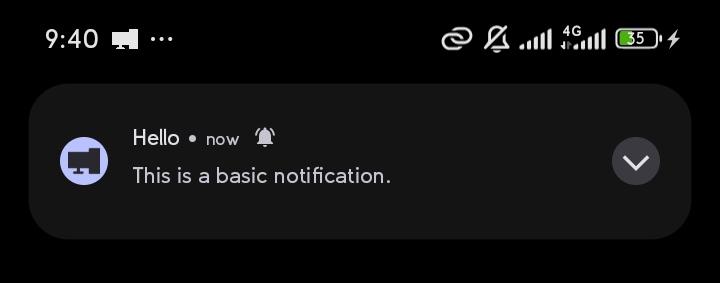
from android_notify import Notification

# Simple notification
Notification(
    title="Hello",
    message="This is a basic notification."
).send()
Sample Image:
Kivy apps:
In your buildozer.spec file, ensure you include the following:
# Add requirements list
requirements = python3, kivy, android-notify
# Add permission for notifications
android.permissions = POST_NOTIFICATIONS
Flet apps:
In your pyproject.toml file, ensure you include the following:
[tool.flet.android]
dependencies = [
  "pyjnius","android-notify"
]

[tool.flet.android.permission]
"android.permission.POST_NOTIFICATIONS" = true- example of complete flet pyproject.toml
On Pydroid 3
On the pydroid 3 mobile app for running python code you can test some features.
- In pip section where you're asked to insert
Libary namepasteandroid-notify - Minimal working example
from kivy.app import App
from kivy.uix.boxlayout import BoxLayout
from kivy.uix.button import Button
from android_notify import Notification, NotificationHandler


class AndroidNotifyDemoApp(App):
    def build(self):
        layout = BoxLayout(orientation='vertical', spacing=10, padding=20)
        layout.add_widget(Button(
            text="Ask Notification Permission",
            on_release=self.request_permission
        ))
        layout.add_widget(Button(
            text="Send Notification",
            on_release=self.send_notification
        ))
        return layout

    def request_permission(self, *args):
        NotificationHandler.asks_permission()

    def send_notification(self, *args):
        Notification(
            title="Hello from Android Notify",
            message="This is a basic notification."
        ).send()


if __name__ == "__main__":
    AndroidNotifyDemoApp().run()
Desktop
For IDE IntelliSense Can be installed via pip install:
pip install android_notify
android-notify -vFor Dev Version usage
requirements = python3, kivy, pyjnius, https://github.com/Fector101/android_notify/archive/main.zipTo use Custom Sounds
Option 1: Audio files bundled in res/raw
- Put audio files in
res/rawfolder, - Then from
buildozer.specpoint to res folderandroid.add_resources = res - and includes it's format
source.include_exts = wav.
Lastly From the code
# Create a custom notification channel with a unique sound resource for android 8+
Notification.createChannel(
    id="weird_sound_tester",
    name="Weird Sound Tester",
    description="A test channel for custom sounds from the res/raw folder.",
    res_sound_name="sneeze" # file name without .wav or .mp3
)

# Send a notification through the created channel
n=Notification(
    title="Custom Sound Notification",
    message="This tests playback of a custom sound (sneeze.wav) stored in res/raw.",
    channel_id="weird_sound_tester" # important tells notification to use right channel
)
n.setSound("sneeze")# for android 7 below
n.send()
Option 2: Local file path or URI (sound_path)
You can use a local audio file, a content://, file://, or android.resource:// URI directly:
# Using a local file path
Notification.createChannel(
    id="local_sound",
    name="Local Sound",
    sound_path="/storage/emulated/0/Download/alert.mp3"
)

# Using a content URI (e.g., from media store)
Notification.createChannel(
    id="uri_sound",
    name="URI Sound",
    sound_path="content://media/external/audio/media/123"
)

# Send notification with custom sound path
n = Notification(
    title="Custom Sound",
    message="Playing from local path",
    channel_id="local_sound"
)
n.setSound(sound_path="/storage/emulated/0/Download/alert.mp3")
n.send()
Private files (e.g., in app's data/ directory) are automatically copied to external storage before playing.
Add Data to Notification
NotificationHandler.data_objectreturns adictof data in the clickednotificationsetDatacan also be called aftersendto changedata_objectstored- Use
nameif value is constantNotification(name="change page")
from android_notify import Notification, NotificationHandler

    def build(self):
        notification = Notification(title="Hello")
        notification.setData({"next wallpaper path": "test.jpg"})
        notification.send()

    def on_start(self):
        notification_data = NotificationHandler.data_object  # {"next wallpaper path": "test.jpg",...}
        print(notifcation_data)

    def on_resume(self):
        notification_data = NotificationHandler.data_object  # {"next wallpaper path": "test.jpg",...}
        print(notifcation_data)
How to control popups
from android_notify import Notification
import time

notification = Notification(
    title="Processing...",
    message="Starting task"
)

notification.send()
time.sleep(10)

# show heads-up when updated
notification.setOnlyAlertOnce(False)

notification.updateTitle("Processing Complete!")
notification.updateMessage("Task finished successfully")
For full documentation, examples, and advanced usage, API reference visit the documentation
If you find this project helpful, consider buying me a coffee! 😊
Or Giving it a star on 🌟 GitHub Your support helps maintain and improve the project.

Found a bug or have an idea for a new feature?
Feel free to open an issue here
When reporting a bug, try to include:
- Device name
- Android version
- Steps to reproduce the issue
- Screenshots or logs (if possible)
Feature suggestions are also welcome.